How to Design a Restaurant Menu That Survives Real-World Scanning
TLDR: Treat a restaurant menu as a decision interface, not a themed poster. Establish the category structure first, make dish names the main scan anchors, attach descriptions and prices unambiguously, and use spacing to show which details belong together. Then test the design at its final size, under realistic lighting, with readers who did not help create it.
Good restaurant menu layout hierarchy design makes four actions feel almost automatic: find the relevant category, recognize a plausible dish, understand what it contains and confirm its price. Decoration can shape the atmosphere, but it cannot rescue a structure that makes starters look like sides or leaves a price floating between two dishes. If the information architecture is wrong, a more expressive typeface merely gives the confusion a nicer outfit.
Do not begin by placing a logo at the top and pouring copy into whatever space remains. Begin with the decisions diners need to make. Someone may scan by course, dietary preference, ingredient, drink type or budget. The layout must provide obvious entry points for those routes without trying to emphasize everything at once.
Map the menu before designing its hierarchy
Turn the raw menu copy into a content inventory. Record every section, dish name, description, price, modifier, dietary marker and recurring note. Include the longest realistic dish name and description rather than designing with unusually tidy samples. A system that works only when the copy behaves is not a system; it is a truce.
Next, identify the primary structure. For a conventional dinner menu, this might be courses. A drinks menu may need to begin with beverage type and then divide by style, serving format or origin. A counter menu could prioritize meal format and customization steps. Choose the structure that matches how a diner starts the decision, not how the restaurant organizes its kitchen.
Audit the category sizes before opening the layout application. If one section contains three items and another contains 24, typography alone will not create balance. The long section may need meaningful subgroups, redundant choices may need editing, or recurring modifiers may need to become a shared note. Research into menu choice has suggested that satisfaction and overload vary with menu type and category size; reported preferred ranges were contextual rather than universal quotas. Use an unusually dense category as a diagnostic prompt, not as evidence that every section must contain a prescribed number of dishes.
- List all content types and mark which ones repeat.
- Group dishes according to the diner’s likely first decision.
- Flag sections with much more content than neighboring sections.
- Standardize repeated phrases, modifiers and dietary markers.
- Resolve ambiguous categories before styling the page.
Build section-level navigation, not competing headlines
A section heading should tell the reader where to look next. It does not need to perform like a movie title. Give section labels one consistent visual treatment and reserve stronger emphasis for the few distinctions that genuinely affect navigation.
Choose one dominant section-level device: typographic headings, spatial breaks, column zones, rules or restrained panels. Combining all five usually makes the page noisier without making it clearer. I would begin with type and space, then add a rule or background change only if the sections still merge at a glance.
Scale is useful, but size is not the only available signal. Weight, case, color, alignment and surrounding space can separate a category heading from an item name. A modest heading with generous space above it may navigate better than a huge heading trapped between adjacent dishes. When the page contains necessary detail, the broader principles in designing a dense information page without clutter also apply: relationships matter more than the mere quantity of content.
Avoid assigning equal visual strength to section headings, featured dishes, prices, icons and promotional callouts. Hierarchy requires inequality. Decide what should be noticed first, second and third, then let quieter information remain quiet.
Make item names the scan anchors
Within a section, the dish name is normally the most useful scan target. It should be distinguishable from both the description and price without needing excessive size. A change in weight, style or color may be enough. The description should look subordinate but remain comfortable to read; pale gray microcopy is not sophistication.
Keep the contrast between name and description deliberate. If names are bold, descriptions can be regular. If names use a distinctive display face, descriptions should usually use a quieter companion face. Limit the number of typographic voices: category, item, description and supporting notation are already four functional roles. Giving each one a different font creates a casting problem rather than a hierarchy.
Descriptions should explain distinctions that affect the choice. Ingredients, preparation and meaningful accompaniments earn space. Repeated adjectives and atmospheric filler do not. Concise descriptions also improve layout flexibility, but editing must preserve information diners actually use.
Connect modifiers to the correct dish
Add-ons, portion options and substitutions often cause more confusion than the main description. Place a modifier directly beneath or beside the item it affects. If the same option applies to a whole section, state it once at section level and style it as a shared instruction. Do not leave a small italic note stranded halfway between two items and expect proximity to sort out the custody dispute.
Choose a price system deliberately
There is no universally correct price position. The right system is the one that lets readers associate each price with its dish while supporting the kind of comparison the menu requires.
| Price treatment | Useful when | Main risk |
|---|---|---|
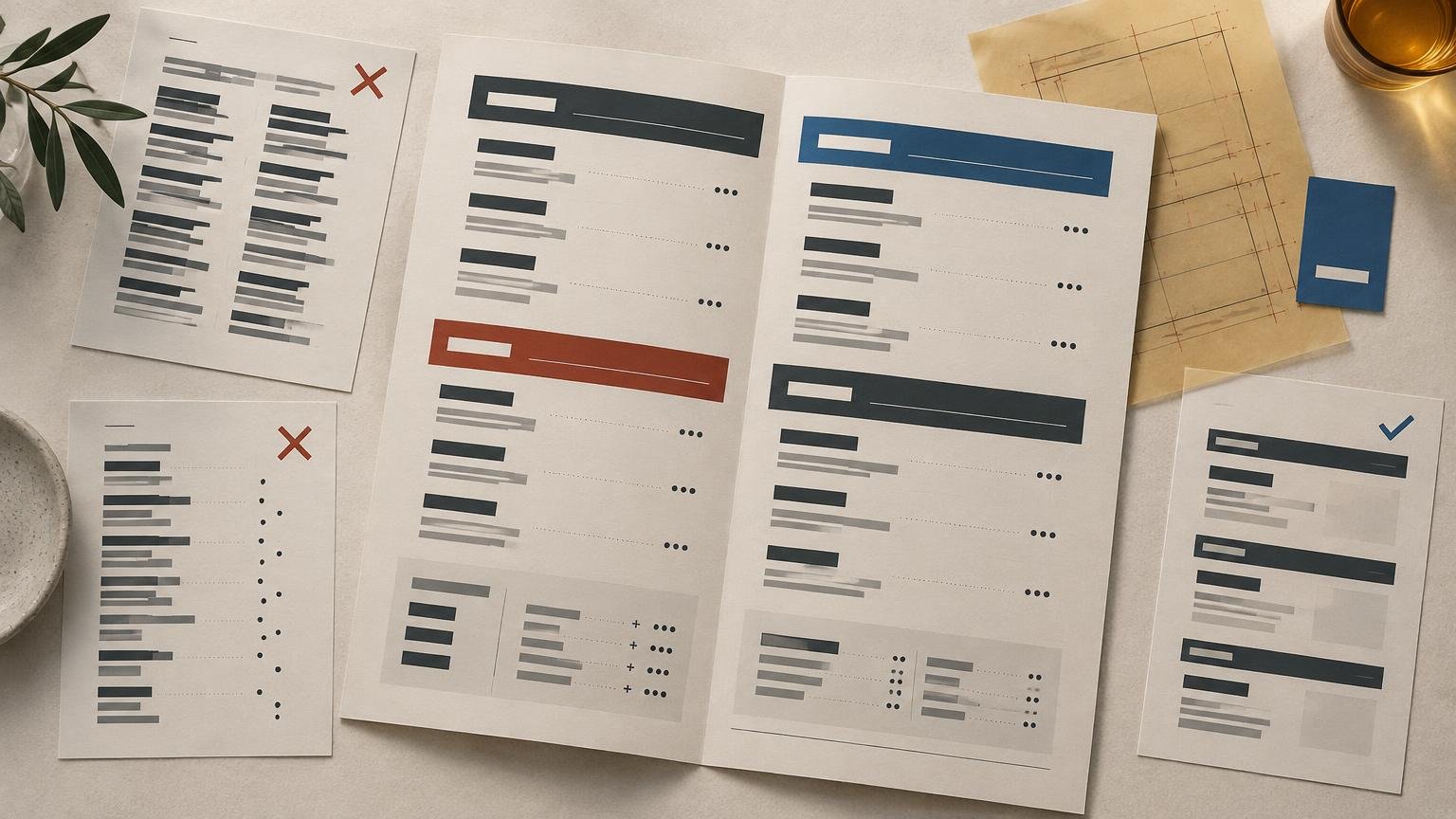
| Flush-right column | Prices are short, rows remain easy to track and comparison is expected | The eye may jump away from the dish or scan the menu as a price list |
| Inline after the dish name | The menu is compact and dish-price association must be immediate | Long names can produce uneven wrapping |
| At the end of the description | Descriptions are brief and the reading flow is linear | Prices can become difficult to locate consistently |
| Indented beneath the item | Items have variants or several serving sizes | The section becomes taller and may fragment scanning |
A right-aligned column is orderly, but it can overstate price comparison and create long horizontal journeys on a wide page. Inline prices reduce that journey but require disciplined spacing. Whichever option you choose, repeat it consistently and check the awkward cases: wrapped names, multiple serving sizes, market-price items and modifier charges.
Do not convert a narrow research result into a visual commandment. A Cornell study comparing dollar signs, numeral-only prices and written-out prices in one lunch setting reported higher spending with numeral-only prices, while cautioning against broad generalization. That finding does not prove that removing currency symbols will produce the same result in every restaurant, nor does it settle alignment or typography. Use price format as one controlled design variable, not as behavioral magic.
Use spacing to show what belongs together
Spacing is structural information. Keep the dish name, its description and its price visually close. Place more space between separate dishes, and substantially more space before a new category. This creates nested groups without requiring a box around every item.
A useful rule is relational rather than numerical: space within an item should be smaller than space between items, and space between items should be smaller than space between sections. The exact values depend on type size, line height, format and density. Test the relationships visually instead of adopting a universal measurement.
White space is not simply unused area. W3C’s cognitive accessibility guidance notes that white space can help people distinguish sections and callouts in digital content, while dense pages can make comprehension harder. W3C guidance on using white space That guidance is written for digital accessibility, not as a printed-menu regulation, but the grouping principle is a useful design lens in either medium.
If the menu does not fit, edit or restructure before reducing everything. Split an oversized category, shorten redundant descriptions, move recurring details into a shared note or reconsider the format. Shrinking type is the fastest way to make every piece of content technically present and practically absent.
Ignore folklore about universal menu hotspots
Do not build the hierarchy around a supposed universal scan path or guaranteed page sweet spot. An eye-movement study of restaurant menus observed scanpaths that differed from commonly repeated menu-design patterns, which is a good reason to be skeptical of fixed claims such as a universal “golden triangle.” Read the restaurant-menu eye-movement study Format, content, familiarity and the reader’s goal can all change what receives attention.
Featured-item treatments can still work, but treat them as emphasis within a clear structure. Use a restrained background, label, rule or typographic change for a genuinely important item. If half the dishes are boxed, starred or enlarged, none is featured; the menu has merely become anxious.
Design for the real object and environment
Set the actual trim size, fold structure and orientation before polishing the typography. A menu held in two hands behaves differently from a wall board, tabletop card or phone screen. Account for folds, binding, safe areas, handling and the distance from which the text will be read.
Print at 100 percent and inspect the physical proof at a seated distance. Test it under lighting that resembles the restaurant, not only beneath a bright studio lamp. Check whether low-contrast text, fine rules or reversed type lose clarity. No supplied evidence establishes one universal minimum point size for printed menus, so final-size proofing is more responsible than repeating a magic number. A printer may publish a production minimum, but a file that can be produced is not necessarily comfortable to read.
Also consider how often the content changes. A highly intricate composition may become fragile when prices or dishes are updated. Use paragraph styles, consistent tabs, defined spacing and reusable components so routine edits do not slowly dismantle the hierarchy.
Treat digital menus as a separate format
A PDF squeezed onto a phone is not a mobile menu strategy. For a responsive digital menu, preserve the same information architecture but adapt the layout to a narrow viewport. Keep category navigation clear, avoid multi-column reading on small screens and ensure that text can reflow without breaking dish-price associations.
For web content, WCAG 2.2 specifies minimum contrast ratios of 4.5:1 for normal text and 3:1 for large text under Success Criterion 1.4.3. Those are digital accessibility thresholds, not printed-menu standards. Printed work still needs physical proofing because paper, ink, lighting and viewing distance change the result.
Test the hierarchy with unfamiliar readers
The designer already knows where everything is, which makes self-testing unusually forgiving. Give the menu to several people who have not watched it develop. Ask them to complete realistic tasks without pointing at the layout.
- Find a vegetarian main course and state its price.
- Locate a dish containing a particular ingredient.
- Find the available portion or serving-size options.
- Identify whether an add-on applies to one dish or the whole section.
- Move from a broad category to one plausible final choice.
Observe hesitation, backtracking and mistaken grouping. If readers overlook a category, strengthen its navigation cue or reconsider its label. If they find a dish but attach the wrong price, fix alignment and proximity. If they repeatedly ask what a modifier applies to, relocate it. Do not start by changing colors or adding icons when the failure is structural.
Run the test on the real output whenever possible. A screen preview cannot reveal whether a fold interrupts a section, a price column disappears into a gutter or ambient light turns a fashionable gray into fog. Revise the hierarchy first and decorative details second.
A practical final check
- Every category has an obvious label and a clear beginning and end.
- Dish names are easier to scan than their descriptions.
- Each description, modifier and price is visibly attached to the correct item.
- Long categories have been edited or subdivided rather than merely compressed.
- Spacing creates stronger separation between groups than within them.
- Emphasis is reserved for a small number of genuinely important items.
- The menu has been proofed at final size and in realistic lighting.
- Digital versions use responsive structure and appropriate web contrast checks.
- At least one unfamiliar reader can complete realistic search tasks without coaching.
Make the choices easy before making the page decorative
A menu succeeds as an information interface before it succeeds as a branded object. The category must be findable, the dish recognizable, the description understandable and the price confirmable. Build those relationships into the structure, prove them in the real format, and only then add the visual character that makes the restaurant feel distinctive.
References
- Menu Choice: Satisfaction or Overload?: Journal of Culinary Science & Technology: Vol 11, No 3
- (PDF) Menu Choice: Satisfaction or Overload?
- $ or Dollars: Effects of Menu-price Formats on Restaurant Checks
- Use White Spacing | Cognitive Accessibility Design Pattern | WAI | W3C
- Eye movements on restaurant menus: A revisitation on gaze motion and consumer scanpaths
- Understanding Success Criterion 1.4.3: Contrast (Minimum) | WAI | W3C